- Download X-Lite software from here and install it.
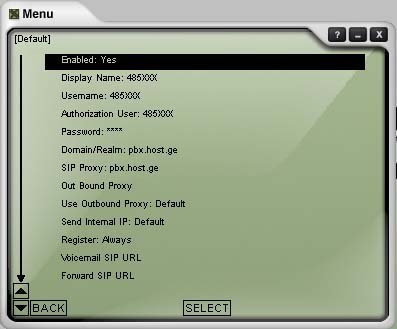
- Configuring the programm is easy - when you run it for the first time, a menu window would appear. You should fill it just like shown on the picture. Type your phone number there. Another way of entering this menu:
Menu->System Setings->Sip Proxy->Default
- To improve sound quality, it is recommended to turn on transmitting silence in X-Lite and X-PRO
Menu->Advanced System Settings->Audio Settings->Silence Settings->Transmit Silence: YES
- It is also possible to use X-PRO program, which has more features.
Voip phone has a free voice mail feature. If you aren't answering a call for 25 second, or your phone is switched off, the voice mail turns on and a caller could leave a message. Dial 700 to listen voice messages. After dialing this number, an interactive menu starts and in order to listen to it press 1 . (Menu is in English)
You can record your personal message . Dial 700, then press 0 than after that 1 and after the signal record you greeting message. When you are finished, press # and finally 1 to save it.
You can check your Voice Mailbox from another phone (city number, mobile or from abroad ). To do this dial 485 700 and enter your phone number (in tone mode) and a voice mailbox password. You can set/change your password by dialing 700. After entering voice menu press 0 and then 4.